What you are creating
A Volta Circuit vault on Stellar is a smart contract account. It has its own address, holds
assets in its own right, and is controlled by the owners you nominate rather than by a single key. Its
address begins with C, which marks it as a contract rather than a
G account belonging to one keypair.
Create the vault
Open Create Vault in the dashboard. There are two screens: one form where you fill in everything, and a review screen before it is published.
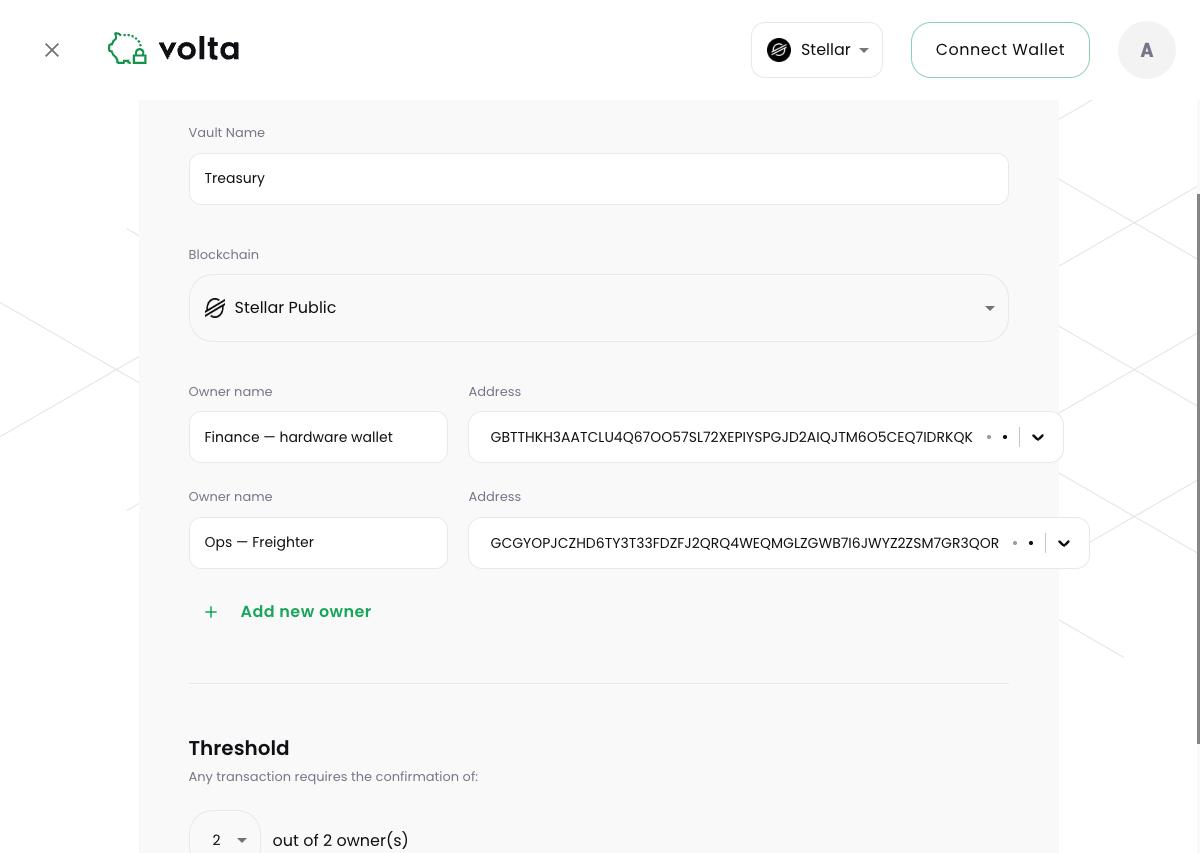
The form
- Vault Name. A label your team sees in Volta Circuit. It is not written to the contract. Choose it carefully — there is currently no way to rename a vault afterwards.
- Blockchain. Pick Stellar Public for real assets, or Stellar Testnet for experiments.
- Owners. Each owner is a Stellar address that can vote on transactions, with an Owner name beside it so votes are readable later. Use Add new owner for more than two. If an owner's address belongs to a wallet already connected to Volta Circuit, you can pick it from the list instead of pasting it.
- Threshold. How many owners must vote Yes before a transaction can be submitted. The list starts at two, and a vault needs at least two owners.
Review and deploy
The review screen lists the owners and threshold one last time. Confirming there asks the wallet you are connected with to sign the deployment, which publishes the contract on Stellar and costs a network fee. That wallet does not have to be an owner — it pays for and submits the deployment, while the owners you listed are who controls the vault afterwards.
Funding the vault
Copy the vault's address from the dashboard and send assets to it. One thing to know before you do: a vault is a contract, and paying a contract is not identical to paying an ordinary Stellar account.
Classic Stellar payments can only be addressed to a G account. Sending to a
C contract address goes through the asset's contract interface instead. Wallets and
services built for Soroban handle this transparently, but anything that only speaks classic payments —
many exchange withdrawal screens among them — will reject a C address or fail to send.
Trustlines and contract vaults
On Stellar, a classic G account must opt in to an asset before it can receive it, through
a trustline. That requirement belongs to classic accounts. A vault is a contract account, its balances
are held by each asset's contract, and it does not need a trustline for every asset
it holds.
Trustlines still matter when a vault pays out to a classic account. If the recipient has not trusted the asset, the payment fails and Volta Circuit reports which account is missing the trustline.
Showing a token in the portfolio
Use Add NFT/Token to list an asset in the vault's portfolio view. Paste the token's contract address and its name, symbol and decimals are read from the token itself.