Receiving
Copy the vault's address from the dashboard and use it as the destination. Two things decide whether the payment arrives:
-
The sender must be able to pay a contract. A vault address begins with
C, and classic Stellar payments can only be addressed to aGaccount. Soroban-aware wallets handle this; services that only send classic payments cannot pay a vault directly. See creating a vault for what to do instead. - The sender must be on the same network. Public and testnet are separate ledgers, and a payment settles on whichever one the sender used. A payment made on testnet completes on testnet — it never reaches a vault on the public network, and testnet assets are worthless in any case. Nothing is destroyed by the mistake; it simply lands somewhere other than the vault you are watching.
The vault does not need a trustline for each asset it holds — that is a requirement of classic accounts, not contract accounts.
Sending
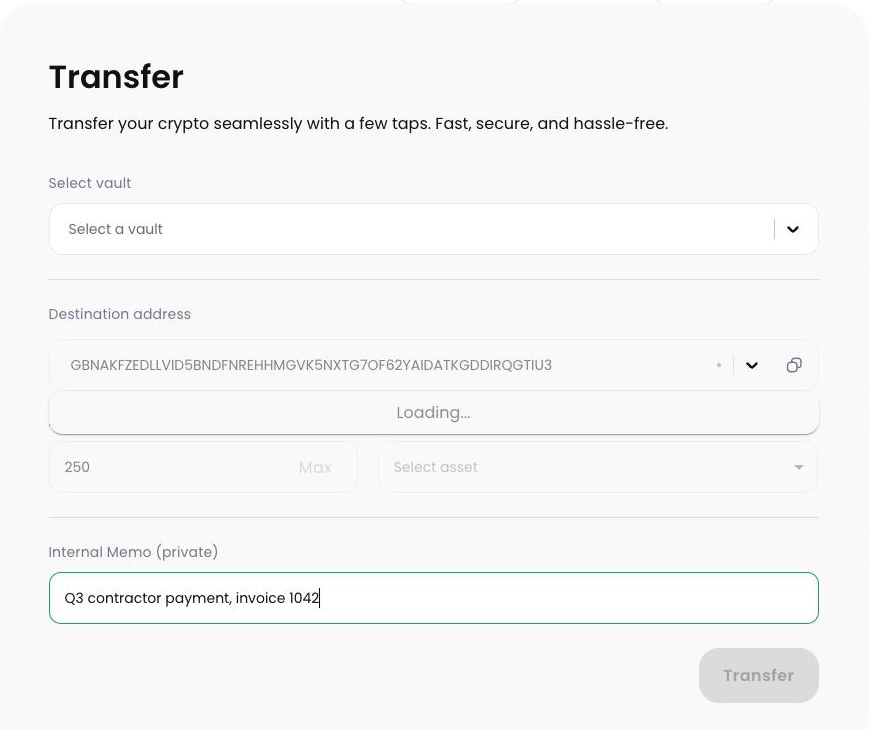
- Open the vault and start a transfer.
- Choose the asset and amount. Only assets the vault already holds are available.
- Enter the destination. Paste the address, or pick a saved entry from the address book.
- Add an internal memo if it helps. Internal Memo (private) is a note to your fellow owners explaining what the payment is for. It is stored by Volta Circuit and shown with the proposal — it is not written to the Stellar network and the recipient never sees it.
- Review and vote. Check the destination and amount, then choose Vote Yes and sign in your wallet. Your vote is one approval, not the transfer itself — and it cannot be changed afterwards.
- Collect the remaining votes. Other owners open the proposal and vote. When the Yes votes reach the threshold, the transaction goes to Stellar.
Checking a destination
Stellar payments are final. Nobody can reverse one, and support cannot recall it. Before approving:
- Compare the whole address, not just the first and last characters.
- Your vote is final, so check before voting rather than after.
-
Confirm the destination can hold the asset. Paying a classic
Gaccount that has not trusted the asset fails — Volta Circuit reports which account is missing the trustline — and a first payment to an unfunded account has to satisfy the minimum reserve. - Check whether the destination requires an on-chain memo — see the warning below, because a vault cannot supply one.
- Send a small test payment first when paying a new destination a large amount.
Destinations that require a memo
Exchanges and custodians usually share one Stellar account across many customers and tell them apart with an on-chain memo. Paying such an address without the memo is how deposits go missing.
Tracking what happened
The transactions view lists everything the vault has done and everything waiting for approval, with how each owner has voted so far. Once submitted, a transaction carries a Stellar hash you can look up on any network explorer, so your record and the ledger's agree.